ReceiptSplit’s warranty tracker uses receipts you already scanned for bill splitting to track manufacturer warranty periods automatically. Tap any past receipt, set the warranty length (90 days, 1 year, 2 years), and ReceiptSplit reminds you 30 days before expiration. No separate app, no re-scanning, no manual entry — the receipt already has the merchant, date, and amount.
You buy a $49.90 sleeping bag at ValueMart in October. Eleven months later, a seam pops on a camping trip. You vaguely remember there was a warranty — was it 90 days? A year? And where did you put the receipt? By the time you figure it out, the warranty period has quietly ended.
This happens constantly. The receipt sits in a drawer or a photo roll, the warranty clock ticks down in the background, and by the time something breaks you’ve forgotten both the coverage window and where the proof of purchase is.
ReceiptSplit already has the receipt — you scanned it to split the bill, or you added it to track a group expense. So adding warranty tracking is a one-tap upgrade, not a separate app. Here’s how the feature works in practice, using real receipts and real scenarios.
Why Warranty Tracking Belongs in a Receipt App
Dedicated warranty apps exist, but they all have the same problem: you have to scan the receipt again, or manually enter the merchant, date, and amount. That’s friction. The kind of friction that kills adoption — most people try the app once, fill in one or two receipts, and never open it again.
ReceiptSplit already has the data. Every receipt in the app includes the merchant name, the purchase date, the total amount, and the item list. All the inputs a warranty reminder needs are already sitting there. Setting a warranty is just one extra tap on a screen you’re already looking at.
There’s no other receipt splitter with warranty reminders, and no warranty tracker with receipt splitting. That’s the whole premise: the receipt already lives here, so let’s make it useful twice.
How It Works in the App
The flow takes about five seconds per receipt. Here’s the full step-by-step:
- Open any receipt in detail view. Tap it from the Home tab or from Receipt History.
- Tap the warranty row. On receipts where warranty makes sense (see the category list below), you’ll see a “Warranty” row with “Not set” as the default value.
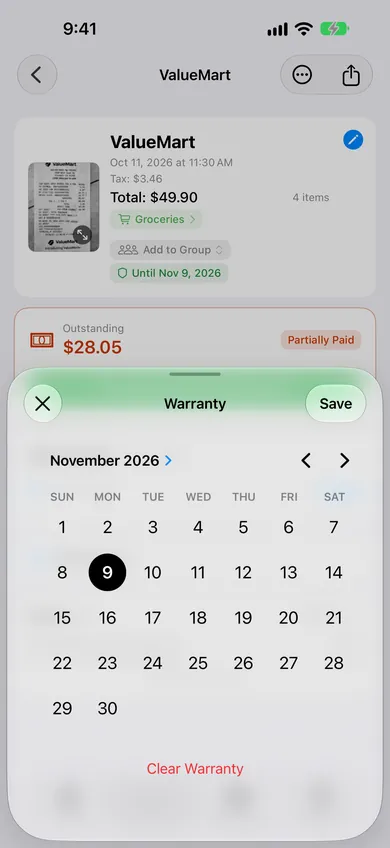
- The date picker opens, defaulted to one year from the purchase date. One year is a common U.S. manufacturer baseline, so this is usually close to what you want. If the product has a different warranty period, scroll the picker to adjust — it takes two taps.
- Tap Save. That’s it. The receipt now shows “Until [date]” on the detail card, and a shield badge appears on the receipt row in the list view.
- Changed your mind? Open the receipt again, tap the warranty row, and hit “Clear Warranty” at the bottom of the picker. The row resets to “Not set” and any scheduled notification is cancelled.
Warranty Reminders on Home
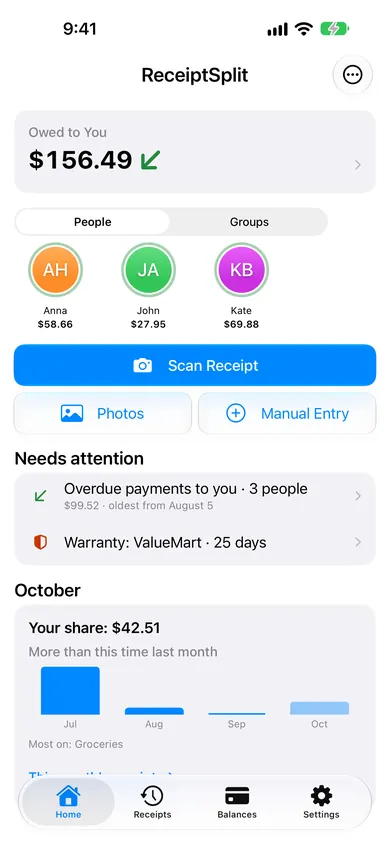
Once at least one of your receipts has a warranty within 60 days of expiring, a row appears under “Needs attention” on the Home tab, for example “Warranty: ValueMart · 25 days.” With several, a second line adds “Ending soon: 3 warranties.” Tap it to open your receipts filtered to the ones with a warranty.
Receipts with active warranties also show a small shield icon on their row in the list. Most of the year the icon is a neutral color, so you notice it without it feeling loud. In the final 60 days before expiry, the shield shifts to orange — a subtle visual cue that something needs your attention before the window closes.
If a warranty has already passed its expiry date, the badge stays visible but dims. The receipt is no longer flagged on Home, but you can still see the historical coverage — useful if you’re wondering “when did that warranty actually end?”
What the Notification Looks Like
This is the whole reason the feature exists. Thirty days before a warranty expires, your iPhone sends you a single push notification at 9:00 AM local time. The body names the merchant — something like “ValueMart warranty expires in 30 days.”
Tap the notification and it opens that exact receipt in the app, so you can pull up the line items, the date, the total, and the original receipt image if you scanned one. That’s everything a retailer or manufacturer’s warranty desk will ask for. You don’t have to hunt through email or a drawer for proof of purchase — it’s already in your hand.
One push, one purpose. No 7-day reminder. No day-of reminder. No “your warranty expired” follow-up. The notification system is deliberately quiet — it buzzes once when you can still actually do something about it, then stays out of your way.
If you decide warranty pushes aren’t for you, there’s a single master toggle in Settings → Notifications that turns them all off at once. The shield badges and the “Needs attention” row keep working either way — only the pushes are gated by the toggle.
Which Receipts Show the Warranty Row
Warranty doesn’t make sense for every receipt. A restaurant bill, a grocery run, a plane ticket — none of those have anything to warrant. So the warranty row is hidden on receipts where the app thinks it would just be noise.
The warranty row shows on receipts categorized as:
- Shopping
- Business
- Health
- Gifts
- Transport
- Housing
- Education
- Entertainment
- Utilities
- Other
The row is hidden on three categories where warranty is genuinely irrelevant: restaurants, groceries, and travel. These are consumable or service categories — there’s nothing to warrant.
One safeguard: if you set a warranty and later change the receipt’s category to one of the hidden three (say, you reclassified a “shopping” receipt as “groceries”), the warranty row stays visible so you don’t accidentally lose data. You can still clear it manually, but the app won’t silently drop it on you.
Privacy: Reminders Stay on Your iPhone
Everything about the warranty system runs locally on your device. When you set a warranty date, the app schedules a standard iOS local notification for 30 days before expiry — the same mechanism a calendar app or reminders app uses. Nothing about the warranty date, the merchant name, the purchase amount, or the receipt itself is sent to any server for the reminder system to work.
That matches the rest of the app’s privacy posture: no account, no tracking, no data sold. Receipts stay on your device, and if you delete the app the notifications go with them. Read the full details on our privacy page.
Frequently Asked Questions
What’s the default warranty length?
One year from the receipt date. That’s a common U.S. manufacturer baseline for consumer electronics, appliances, and general retail — so for most purchases, the default is roughly right. The picker opens with that date preselected and you adjust it in two taps if your specific product has a different period.
Can I set warranties on receipts I scanned months ago?
Yes. As long as the warranty end date is still in the future, the notification gets scheduled. If less than 30 days remain at the time you set it, the push fires at the next 9:00 AM local time instead of waiting for the 30-day window. This handles the case where you’re catching up on an old receipt with a warranty that’s already running short.
What if a receipt covers multiple items with different warranties?
Each receipt holds one warranty date, typically set to the earliest expiring item. If you bought a laptop and a monitor on the same receipt with different coverage periods, the cleaner approach is to track them as separate receipts — you can enter the monitor manually in a minute or two. That keeps each notification specific to one product.
Do I need internet for warranty notifications?
No. The scheduling and firing of warranty notifications happen entirely on your iPhone via standard iOS APIs — the same system that powers calendar reminders and alarm clocks. Airplane mode, no Wi-Fi, international trip with data off — none of it affects your warranty pushes.
Is warranty tracking free?
Yes, completely. Warranty tracking is included on the free tier along with all splitting, payment, and balance features. It’s not part of the Pro AI scanning subscription — Pro only unlocks unlimited AI receipt scans. You can use the warranty feature forever without upgrading.
Scan it. Set the warranty. Forget about it until iOS reminds you.
ReceiptSplit is free, no account required, no warranty subscription on top.
Download Free on the App Store