Splitting a restaurant bill should be simple. Everyone eats, everyone pays, everyone goes home happy. But in practice, it rarely works out that cleanly. One person ordered a salad and water. Another had the ribeye, two cocktails, and dessert. When the check arrives and someone says "let's just split it evenly," you can feel the tension at the table even if nobody says a word.
This guide covers four practical ways to divide a restaurant bill, explains how to handle the often-overlooked complexity of tip and tax, and shows you how to skip the mental math entirely.
Why Equal Splits Aren't Always Fair
Imagine this: you're at dinner with five friends. You ordered a garden salad and sparkling water for $14. Your friend across the table had the filet mignon, a bottle of wine to share (mostly with himself), and crème brûlée, totaling $68. The bill comes to $240 for the table. Split evenly, that's $48 per person — more than three times what you actually ordered.
This isn't a hypothetical edge case. It happens every time a group eats out and orders are uneven, which is most of the time. As NPR has reported, most diners believe everyone should pay for what they ordered, but few actually speak up when the bill arrives. The gap between what people want and what they do creates a recurring source of low-grade resentment, especially among friends who eat out together regularly.
The reason nobody speaks up is the awkwardness factor. Asking to pay only for your items can feel petty, even when it's the objectively fair thing to do. People would rather overpay by $15 than risk being seen as cheap. That's a social tax, and it adds up — dining out twice a month with a $10 overpayment each time costs you $240 a year for food you never ate.
The real problem isn't math — it's friction. Most people know that splitting by item is fairer. They just don't want to be the one pulling out a calculator at the dinner table. Removing that friction is what makes the difference.
4 Ways to Split a Restaurant Bill
There's no single right answer. The best method depends on the group, the occasion, and how different the orders are. Here are your four options, ranked from simplest to most precise.
1. Split Equally
Divide the total (including tip and tax) by the number of people. Everyone pays the same amount.
When it works: This is the right call when everyone ordered roughly the same thing, or when you're at a family-style restaurant where dishes are shared. It's also fine for close friends who trade off treating each other and don't keep score.
When it doesn't: If one person's order was significantly more or less expensive than the average, an even split quietly punishes the lighter eater and subsidizes the heavier one. Over time, this can discourage people from joining group dinners, especially those on tighter budgets.
How to do it: Take the total bill (after tax and tip), divide by headcount. On a $200 bill with 5 people, each person pays $40. Simple, but not always fair.
2. Split by What You Ordered (Item-by-Item)
Each person pays for exactly the items they consumed, plus their proportional share of tax and tip.
When it works: This is the fairest method in nearly every situation. Nobody overpays, nobody underpays. It's especially important when there's a wide range in order totals — one person's $12 lunch versus another's $55 dinner-and-drinks.
When it doesn't: It can be tedious to do manually. Going line by line through a receipt, assigning items, and then calculating each person's share of tax and tip requires more math than most people want to do after a meal. Shared plates (appetizers, pitchers, desserts) add another layer of complexity.
How to do it: List what each person ordered, total their items, then add their proportional share of tax and tip. We'll cover exactly how to calculate proportional tip and tax in the next section.
3. Split by Percentage
Assign each person a percentage of the total bill based on roughly how much they ordered.
When it works: Good for couples splitting with another couple when one pair ordered more. Also useful for situations where one person clearly ordered the majority — say someone had an expensive bottle of wine while others stuck to entrees. Rather than going item by item, you can agree that one person pays 40% and the other three split the remaining 60%.
When it doesn't: Percentages are estimates, so they're not as precise as item-by-item splitting. And agreeing on the percentages requires a potentially awkward negotiation at the table.
How to do it: Agree on rough percentages, then multiply each person's percentage by the total bill. On a $200 bill: Person A (40%) pays $80, Persons B, C, and D (20% each) pay $40.
4. Use a Receipt Splitting App
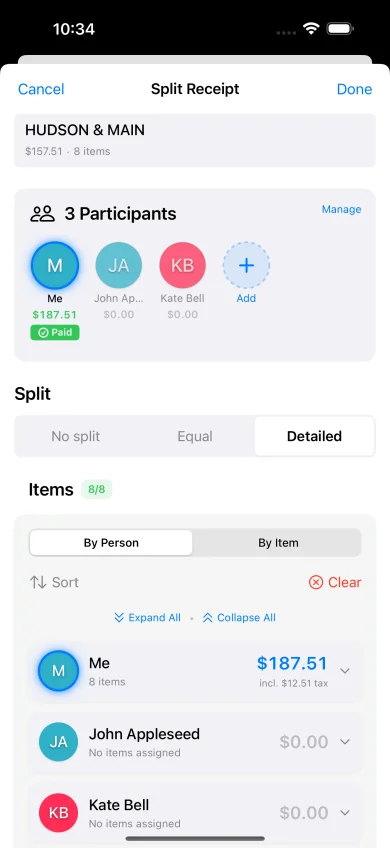
Scan the receipt with your phone, assign items to each person, and let the app handle tax and tip proportionally.
When it works: Every time. A receipt splitting app combines the fairness of item-by-item splitting with the ease of an even split. You don't need to do any math, and there's no awkward moment where someone pulls out a calculator. You scan, tap, and everyone sees exactly what they owe in seconds.
When it doesn't: If you're splitting between two people who ordered the same thing, it's overkill. Just split evenly.
How to do it: Open a receipt splitting app like ReceiptSplit, point your camera at the receipt, and the app reads every line item automatically. Then you tap to assign items to each person. Tax and tip are calculated proportionally — so the person who ordered more pays more tip, which is how it should work.
How to Handle Tip and Tax When Splitting a Bill
This is the part most people get wrong, and it's where the biggest discrepancies hide.
When you split a bill equally, tip and tax are straightforward: divide them evenly, same as the food. But when you split by item, tip and tax should be proportional to what each person ordered, not divided equally. Here's why.
Say two friends go to dinner. Alex orders $30 worth of food. Jordan orders $70 worth of food. The subtotal is $100. Tax is 8.5% ($8.50) and they tip 20% ($20). The total bill is $128.50.
The Wrong Way: Equal Tip and Tax
| Alex | Jordan | |
|---|---|---|
| Food | $30.00 | $70.00 |
| Tax (equal) | $4.25 | $4.25 |
| Tip (equal) | $10.00 | $10.00 |
| Total | $44.25 | $84.25 |
The Right Way: Proportional Tip and Tax
Alex ordered 30% of the food ($30 / $100). Jordan ordered 70%. So Alex pays 30% of the tax and tip, and Jordan pays 70%.
| Alex | Jordan | |
|---|---|---|
| Food | $30.00 | $70.00 |
| Tax (proportional) | $2.55 | $5.95 |
| Tip (proportional) | $6.00 | $14.00 |
| Total | $38.55 | $89.95 |
The difference: Alex saves $5.70 with proportional splitting. That might not sound like much on one bill, but it adds up. If Alex consistently orders lighter meals, they'd overpay by $5 to $12 every time the group splits tip and tax equally. Over a year of monthly dinners, that's $60 to $144 in subsidies for other people's orders.
The formula is simple: Your share of tip = (your food total / group food total) × total tip. Same formula for tax. This ensures the person who ordered more expensive items contributes proportionally more to the tip and tax. Need a quick way to figure out the tip? Use our free tip calculator — it handles pre-tax tipping, rounding, and splitting between any number of people.
The challenge, of course, is that nobody wants to do this math at the table. Doing it by hand requires knowing each person's subtotal, the total subtotal, and then calculating individual percentages. This is precisely the problem that receipt splitting apps solve — they do this calculation automatically for every person in the group. According to the Emily Post Institute's tipping guide, the standard restaurant tip is 15-20% of the pre-tax subtotal, and splitting that proportionally is the most equitable approach when dividing by items ordered.
The Easiest Way to Split a Restaurant Bill
The fairest method — item-by-item with proportional tip and tax — used to be the hardest to execute. You'd need a calculator, a pen, and the patience of the table while you worked out everyone's share. That's no longer the case.
Here's how it works with a receipt splitting app:
- Scan the receipt. Point your phone camera at the bill. The app uses OCR (optical character recognition) to read every line item, quantity, and price automatically. No typing required.
- Add your group. Enter the names of everyone at the table. If you eat with the same people often, most apps let you save groups so you can load them with one tap.
- Assign items. Tap each item and select who ordered it. Shared plates? Tap multiple people and the app splits that item evenly among them.
- Set tip percentage. Choose your tip amount. The app calculates each person's proportional share of both tip and tax automatically.
- Send payment requests. Each person gets a message showing exactly what they ordered and what they owe. They can pay via Venmo, PayPal, Cash App, or however your group settles up.
The whole process takes about 30 seconds. No mental math, no awkward negotiations, no subsidizing someone else's lobster. Apps like ReceiptSplit are built specifically for this workflow — scan, assign, send. It's the same fairness as calculating everything by hand, with none of the friction.
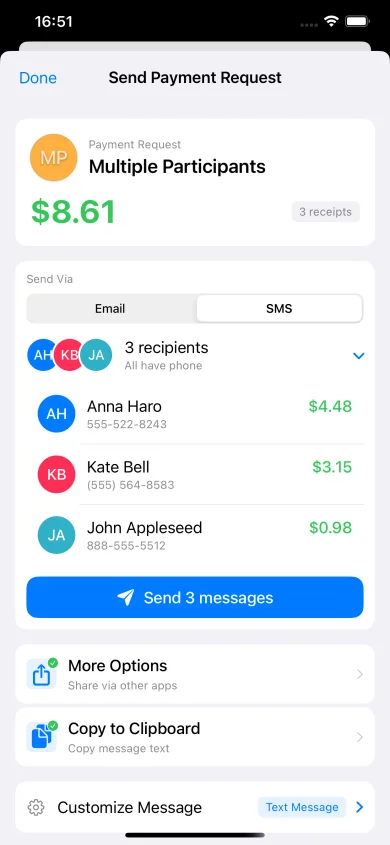
The biggest benefit isn't even the math. It's that nobody has to be the person who suggests splitting by item. The app normalizes precision. When you say "let me scan this and we'll each get our total," it feels collaborative rather than cheap. That social shift is what makes the whole thing work.
Frequently Asked Questions
What's the fairest way to split a restaurant bill?
The fairest method is splitting by what each person ordered (item-by-item) with proportional tip and tax. This means each person pays for their own food, plus a share of the tip and tax that matches their percentage of the total food order. If you ordered 25% of the food, you pay 25% of the tip and tax. This avoids the common problem where lighter eaters subsidize heavier orders. A receipt splitting app makes this effortless.
Should you split the bill on a date?
It depends on the context and what both people are comfortable with. On a first date, it's common for one person to offer to pay or for both to offer to split. The key is communication — nobody should feel pressured either way. For established couples dining with other couples, splitting the bill between the two pairs is standard. If one couple ordered significantly more (say a bottle of wine the other couple didn't drink), offering to cover the difference is a considerate move. There's no universal rule here — just be direct and kind about it.
How do you split a bill when someone doesn't drink?
Non-drinkers shouldn't pay for alcohol they didn't consume. The simplest approach is to separate drinks from food: split the food portion evenly (or by item), and have drinkers split the alcohol separately among themselves. If you're using a receipt splitting app, just assign the drinks only to the people who ordered them. This is one of the most common sources of bill-splitting frustration, and it's completely avoidable with item-by-item splitting. According to restaurant etiquette guides, non-drinkers should not be expected to subsidize others' alcohol.
Is it rude to ask to split the bill?
No. Splitting the bill is standard practice in most social settings and most people actually prefer it. What can feel awkward is how you bring it up. The smoothest way is to mention it early — "Should we split this?" when ordering, rather than after the bill arrives. Or better yet, use a receipt scanning app when the check comes. Saying "let me scan this so we each get our total" is casual and removes any tension. The only situations where splitting might be unusual are celebrations where someone is being treated (birthdays, promotions) or business meals where one party is hosting.
What's the easiest app for splitting restaurant bills?
Several apps handle bill splitting, each with different strengths. ReceiptSplit is designed specifically for scanning physical receipts and assigning items, with automatic proportional tip and tax calculation. Splitwise is popular for tracking ongoing shared expenses between roommates or travel groups. Venmo and PayPal have basic split features built into their payment flows. For restaurant-specific splitting where you want to go item-by-item from a scanned receipt, a dedicated receipt splitting app will give you the most accurate results with the least effort.
Skip the math. Scan the receipt.
ReceiptSplit splits bills item-by-item with proportional tip and tax — in seconds.
Download Free on the App Store